In this lesson we will learn how to get the Potention Meter's angle from the web.
## Connect
Potention Meter is a part that changes its resistor value according to its angle or position.
obniz can read the resistor value by using AD.
As obniz has [Potentiometer](/sdk/parts/Potentiometer), let's use this for programming.
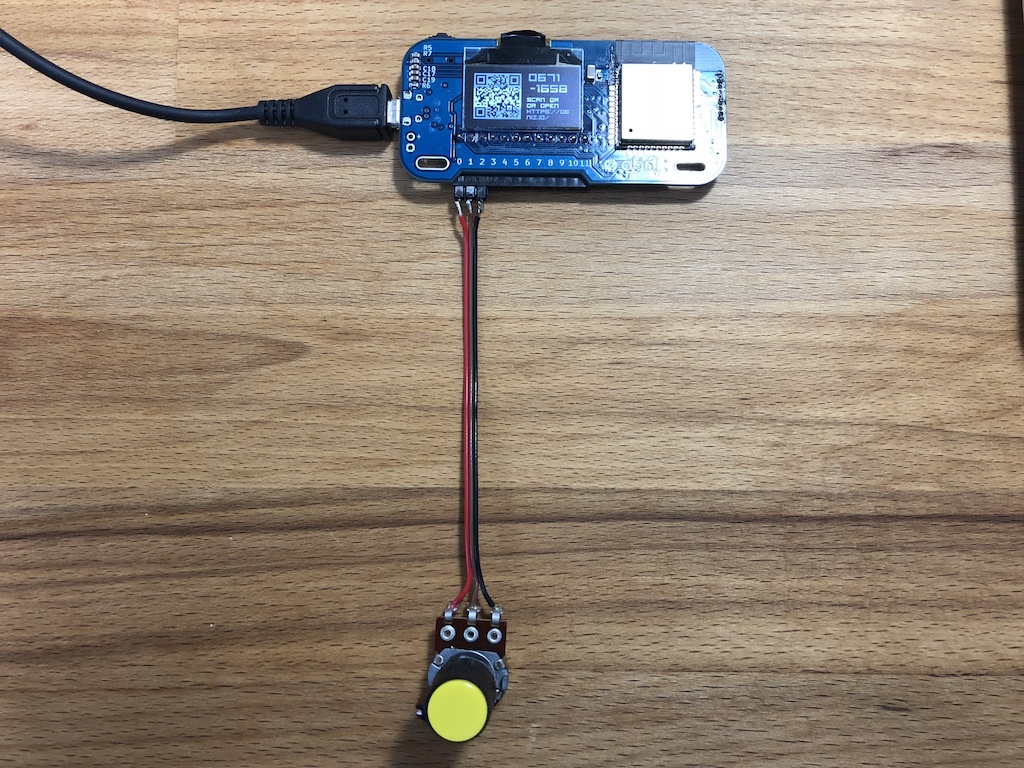
Connect the three cables of the potentiometer to obniz io 0, 1, 2.
See the image below.

Let's show the angle on HTML when the angle changes. The steps are:
1. Get the changed angle of the potentiometer
2. Show the angle as text on HTML
First, create a meter object.
```
var meter = obniz.wired("Potentiometer", {pin0:0, pin1:1, pin2:2});
```
And add a function that will be called when the meter's angle changes.
```
meter.onchange =function(position) {
};
```
The variable "position" has a position value.
Its value is set between 0 and 1. So, 0.5 means it is half way turned.
## Add DOM
Let's add div in the body to print the position.
Add the code below to the top of your code.
```
```
Now we can print a string onto this when the meter gets turned.
By using jQuery, texts can be set as below.
```
$("#print").text("Hello")
```
Now the code has been prepared. This way, you can set the content of the id "print" to "Hello".
Below is the full code.
```
PotensionMeter
```
Copy&paste this code to the program page, change the obniz id and run the program.
How did it go? I believe the letters on the page changed as the meter's angle changed.