<p>If you have any trouble starting or setting up obniz Board, please check the following or see <a rel="noreferrer noopener" href="https://obniz.zendesk.com/hc/ja/categories/360002362311-FAQ" target="_blank">FAQ</a>.         <br>Please let us know if you have any questions (<a rel="noreferrer noopener" href="https://obniz.zendesk.com/hc/ja/requests/new" target="_blank">Contact</a>).</p>


<h3 id="display-on-obniz-board">Display on obniz Board<a class="anchorjs-link " href="#display-on-obniz-board" aria-label="Anchor" data-anchorjs-icon="#" style="padding-left: 0.375em;"></a></h3>


<div style="height:20px" aria-hidden="true" class="wp-block-spacer"></div>


<div class="wp-block-columns border-bottom">
<div class="wp-block-column" style="flex-basis:20%">
<p>Display on obniz Board</p>
</div>


<div class="wp-block-column" style="flex-basis:30%">
<p>Problem / Error</p>
</div>


<div class="wp-block-column" style="flex-basis:50%">
<p>How to solve</p>
</div>
</div>


<div class="wp-block-columns">
<div class="wp-block-column" style="flex-basis:20%">
<figure class="wp-block-image size-large"><img src="images/error-donotshow-1.png?w=835&amp;ssl=1" alt="" class="wp-image-1669" width="94" height="47"></figure>
</div>


<div class="wp-block-column" style="flex-basis:30%">
<p>Nothing appears on the display.</p>
</div>


<div class="wp-block-column" style="flex-basis:50%">
<p>Try the following in order.</p>


<ol><li>Reboot(Unplug USB and connect again)</li><li>Changing the battery or USB cable</li></ol>
</div>
</div>


<p class="bg-attention">If it does not improve, there is a possibility of obniz Board failure (initial failure).     Products with initial failure will be exchange new Board for free within a month after purchase.<br>   Please <a rel="noreferrer noopener" href="https://obniz.zendesk.com/hc/ja/requests/new" target="_blank">contact us</a>.</p>


<div class="wp-block-columns border-bottom">
<div class="wp-block-column" style="flex-basis:20%">
<figure class="wp-block-image size-large"><img src="images/error-wrongpass-1.png?w=835&amp;ssl=1" alt="" class="wp-image-1673" width="94" height="47"></figure>
</div>


<div class="wp-block-column" style="flex-basis:30%">
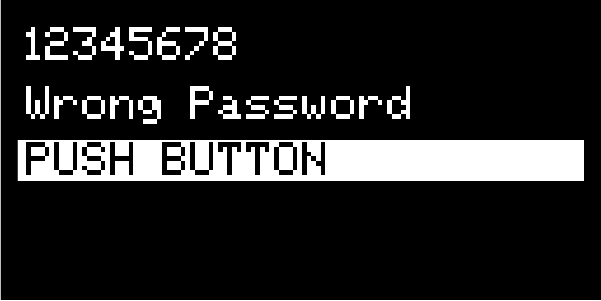
<p>[Wrong password]<br>Incorrect password entered (OS 2.1.1 or earlier)</p>
</div>


<div class="wp-block-column" style="flex-basis:50%">
<p>Please re-enter your password.</p>
</div>
</div>


<div class="wp-block-columns border-bottom">
<div class="wp-block-column" style="flex-basis:20%">
<figure class="wp-block-image size-large"><img src="images/error-cantconnect-1.png?w=835&amp;ssl=1" alt="" class="wp-image-1668" width="94" height="47"></figure>
</div>


<div class="wp-block-column" style="flex-basis:30%">
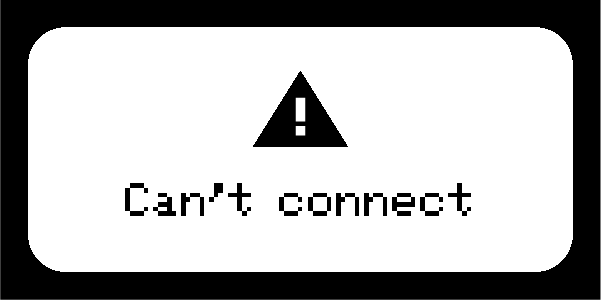
<p>[Can’t connect]<br>Passwords do not match or Cannot connect to Wi-Fi(OS 3.0.0 or later)</p>
</div>


<div class="wp-block-column" style="flex-basis:50%">
<p>The previously set Wi-Fi may not be found, or the selected SSID or password may be incorrect.<br>
Restart Board and set up Wi-Fi connection again.</p>
</div>
</div>


<div class="wp-block-columns border-bottom">
<div class="wp-block-column" style="flex-basis:20%">
<figure class="wp-block-image size-large"><img src="images/error-tcp-1.png?w=835&amp;ssl=1" alt="" class="wp-image-1672" width="94" height="47"></figure>
</div>


<div class="wp-block-column" style="flex-basis:30%">
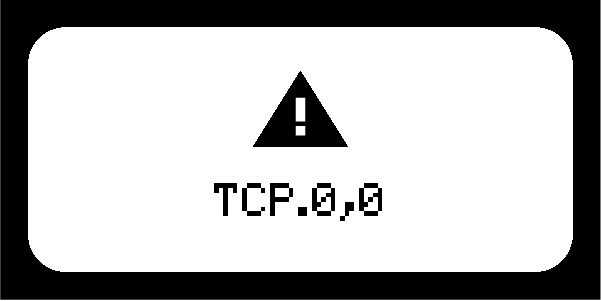
<p>TCP error</p>
</div>


<div class="wp-block-column" style="flex-basis:50%">
<p>The connection was not successful, for example Connected to Wi-Fi but not connected to serve, or DNS is not possible etc… </p>
</div>
</div>


<div class="wp-block-columns border-bottom">
<div class="wp-block-column" style="flex-basis:20%">
<figure class="wp-block-image size-large"><img src="images/error-maintenance-1.png?w=835&amp;ssl=1" alt="" class="wp-image-1671" width="94" height="47"></figure>
</div>


<div class="wp-block-column" style="flex-basis:30%">
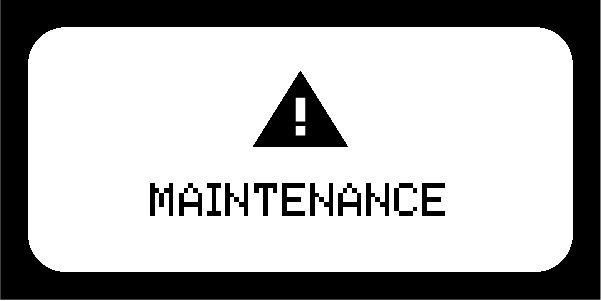
<p>MAINTENANCE</p>
</div>


<div class="wp-block-column" style="flex-basis:50%">
<p>Displayed during maintenance or update of the server (obniz Cloud). It usually recovers within a few seconds, please wait.</p>
</div>
</div>


<div class="wp-block-columns border-bottom">
<div class="wp-block-column" style="flex-basis:20%">
<figure class="wp-block-image size-large"><img src="images/error-inactive-1.png?w=835&amp;ssl=1" alt="" class="wp-image-1670" width="94" height="47"></figure>
</div>


<div class="wp-block-column" style="flex-basis:30%">
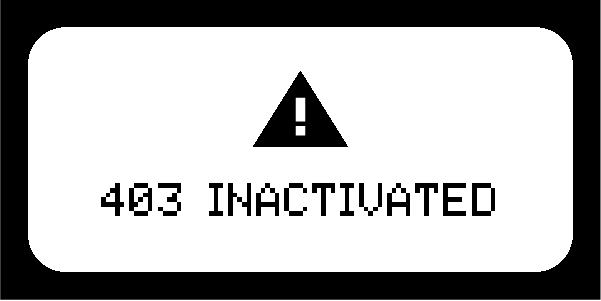
<p>XXX INACTIVATED</p>
</div>


<div class="wp-block-column" style="flex-basis:50%">
<p>Displayed when the obniz Board or the user who owns it is not active.         <br>From <a href="https://console.obniz.com/devices">Device setting</a>, change the setting to Active.</p>
</div>
</div>


<div class="wp-block-column" style="flex-basis:50%">
<p>When power up with dial switch being pressed, You will be on setting.         <br>About each menu, see blow: <a href="/reference/board-1y/setting-screen">Setting Screen</a></p>
</div>
</div>


<div class="wp-block-group bg-light"><div class="wp-block-group__inner-container">
<h3>About Wi-Fi</h3>


<p>Wi-Fi should have DHCP and 2Ghz band. </p>


<p>If you are unable to connect to the Wi-Fi once connected, it is expected that the network settings has changed.<br>
  Please check the following in order.</p>


<ol><li>Restart obniz Board (Power plug in / out)</li><li>Restart Wi-Fi router</li><li>Change to other Wi-Fi</li></ol>
</div></div>


<div style="height:30px" aria-hidden="true" class="wp-block-spacer"></div>


<p>If you have any other problems, please check the <a rel="noreferrer noopener" aria-label="FAQ (opens in a new tab)" href="https://obniz.zendesk.com/hc/ja/categories/360002362311-FAQ" target="_blank">FAQ</a>.</p>