

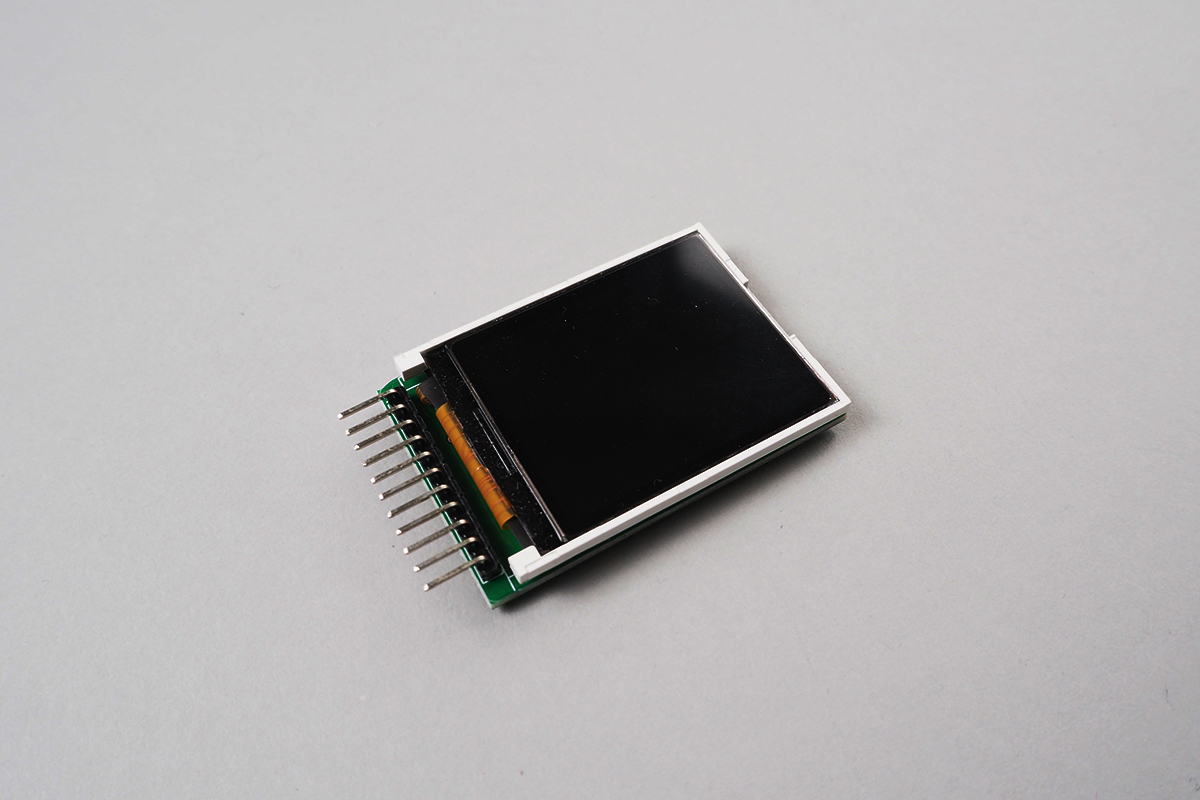
- Usable Devices :
-
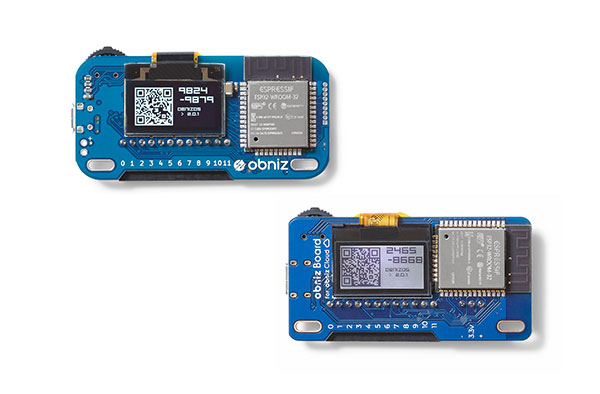
- Found at :
 a.co
www.aliexpress.com
a.co
www.aliexpress.com
SainSmartTFT18LCD
Library for Sainsmart 1.8 inch TFT
Drawing supports. But This library doesn't include MicroSD access yet.

SPI is used to communicate.
obniz Board can't draw fast as Arduino/Raspberry Pi.
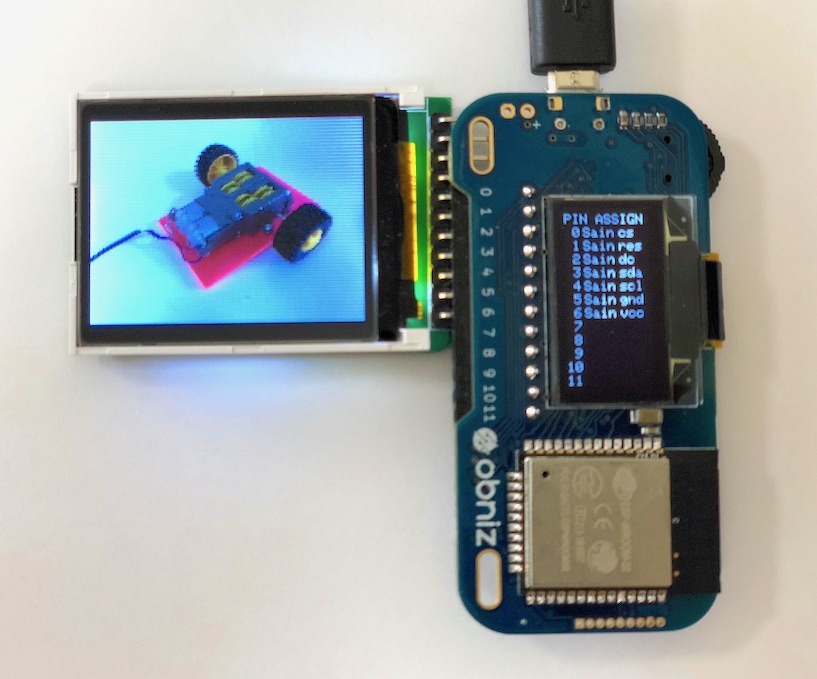
wired(scl, sda, dc, res, cs {, vcc, gnd })
Connect scl, sda, dc, res, cs, vcc, gnd to an obniz Board and specify ios like follow.
sd-card related io is not necdesarry.
// Javascript Example
lcd = obniz.wired('SainSmartTFT18LCD', { scl:4, sda:3, dc:2, res:1, cs:0, vcc:6, gnd:5 });
Drawing API
witdh and height property
You can retrive witdhandheight from property.
// Javascript Example
lcd = obniz.wired('SainSmartTFT18LCD', { scl:4, sda:3, dc:2, res:1, cs:0, vcc:6, gnd:5 });
console.log(lcd.width);  //128
console.log(lcd.height); //160
color16(r, g, b)
Get 16bit color pallet for specified rgb. Each r,g,b msut be in 0 to 255.
Result is 16bit format.
16bitRGB = Red(r):upper 5bit、Green(g):lower 6bit、Blue(b): lower 5it
Or you can specify preset 16bit RGB color.
pixel for raw() and rawBound() is 24bit. But It down to 18bit RGB when drawing.
// Javascript Example
let red = lcd.color16(255, 0, 0); //16bitRGB for red
lcd.drawRect(0, 0, lcd.width, lcd.height, red);
Common arguments
| Argument | Description |
|---|---|
| x y |
xandy coordinate。 |
| width height |
dimention of drawing |
| color | 16bit color |
| radius | radius on drawing circle |
| round | corner radius |
| backgroundColor | background color for drawing dwarChar(), drawString(). If you specify same color as color, then background color is transparant |
| size | text size for dwarChar(), drawString(). 1-4. No smoothing. |
Drawing API
fillScreen(color)
Fill whole screen with specified color.
drawRect(x, y, width, height, color)
fillRect(x, y, width, height, color)
Draw a rectangle. Regarding x, y, width, height and color.
This draw only border. fillRect() will Fill a rectangle.
drawRoundRect(x, y, width, height, round, color)
fillRoundRect(x, y, width, height, round, color)
Draw a rectangle with corner radius. Regarding x, y, width, height and color and round.
This draw only border. fillRoundRect() will Fill a rectangle.
drawCircle(x, y, radius, color)
fillCircle(x, y, radius, color)
Draw a circle. Regarding x, y and radius and color.fillCircle() will fill a circle.
drawTriangle(x0, y0, x1, y1, x2, y2, color)
fillTriangle(x0, y0, x1, y1, x2, y2, color)
drawTriangle() will draw a triangle regarding three points x0, y0,x1, y1,x2, y2 with color.fillTriangle() will fill a triangle.
drawVLine(x, y, height, color)
drawHLine(x, y, width, color)
drawVLine() will draw a vertical line x, y to heightdrawHLine() will draw a horizonal line x, y to width with color.
Each function works faster than drawLine().
drawLine(x0, y0, x1, y1, color)
drawLine() will draw a line x0, y0 to x1, y1 with color.
// Javascript Example

// 16bit-RGB color value
const BLACK   = 0x0000;
const BLUE    = 0x001F;
const RED     = 0xF800;
const GREEN   = 0x07E0;
const CYAN    = 0x07FF;
const MAGENTA = 0xF81F;
const YELLOW  = 0xFFE0;
const WHITE   = 0xFFFF;
lcd.fillScreen(BLACK);
lcd.drawRoundRect(0, 0, lcd.width, lcd.height, 8, RED);
lcd.fillRect(10, 10, lcd.width - 20, lcd.height - 20, MAGENTA);
await obniz.wait(1000);
lcd.drawRect(14, 14, lcd.width - 28, lcd.height - 28, GREEN);
lcd.fillRoundRect(20, 20, lcd.width - 40, lcd.height - 40, 4, CYAN);
await obniz.wait(1000);
lcd.drawCircle(0, 0, 100, BLACK);
lcd.fillCircle(64, 80, 40, YELLOW);
lcd.drawCircle(64, 80, 40, RED);
await obniz.wait(1000);
lcd.drawTriangle(64, 24, 24, lcd.height - 24, lcd.width - 24, lcd.height - 24, BLACK);
lcd.fillTriangle(64, lcd.height - 48, 24, 48, lcd.width - 24, 48, GREEN);
await obniz.wait(1000);
lcd.drawVLine(64, 10, lcd.height - 20, RED);
lcd.drawHLine(10, 80, lcd.width - 20, BLUE);
lcd.drawLine(10, 10, lcd.width - 10, lcd.height - 10, BLACK);
drawChar(x, y, char, color, backgroundColor {, size })
drawString(x, y, string, color, backgroundColor {, size {, wrap }})
drawChar() draw ACII single character atx, y with char specified with color and backgroundColor and size.
drawString() draw string.
wrap=true will automatically use new line when overflow.
And final coordinate wil be returnd.
// Javascript Example
:  :
let white = lcd.color16(255, 255, 255);
let red = lcd.color16(255, 0, 0);
let yellow = lcd.color16(255, 255, 0);
lcd.drawChar(0, 0, '+', yellow, red, 4);
var x = 7, y = 32;
[x, y] = lcd.drawString(x, y, 'This is 1st draw.', white, white);
[x, y] = lcd.drawString(x, y, 'This is 2nd draw.', red, red, 2, true);
If you want to draw not ascii string. Use Canvas and transfer by using drawContextBound() and drawContext().
drawContextBound(context, x0, y0, width, height, x1, y1)
drawContext(context)
drawContextBound() and drawContext() use canvas.context(2D) to draw a LCD.
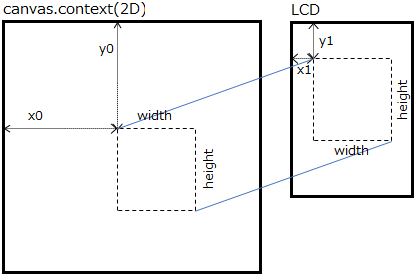
Specify context to canvas.context and region x0, y0, width, height.
And destination is x1, y1.
drawContext()is equal to drawContextBound(context, 0, 0, lcd.width, lcd.height, 0, 0).
Drawing speed depends on network. At minimum drawContext() takes around 300 msec.
// Javascript
//<canvas id="canvas" width="128" height="160"></canvas>
let canvas = $('#canvas');
let context = canvas[0].getContext('2d');
context.fillStyle = '#FFFFCC';
context.fillRect(0, 0, lcd.width, lcd.height);
lcd.drawContext(context, false);
Other APIs
setRotation(dir)
Set LCD direction by specifing 0 to 3. Default is 0.
This function doesn't affect current display.
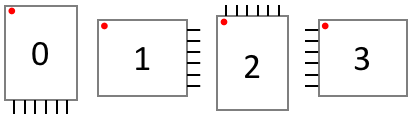
After calling this, witdh and height will be updated. x=0, y=0 points is like this image.
// Javascript Example
:  :
lcd.fillScreen(0); //clear screen to black
for (let n = 0; n < 4; n++) {
  lcd.setRotation(n);
  lcd.drawChar(0, 0, n+'', 0xFFFF, 0xFFFF, 2);
  lcd.fillCircle(2, 2, 2, 0xF800); // plots origin point to red
}
setInversionOn()
setInversionOff()
setInversion(inversion)
Invert a displayed color.
setInversionOn(): Invert
setInversionOff(): Not Invert
setInversion(inversion): inversion=true is Invert.
rawBound(x, y, width, height, [pixel0, pixel1, pixel2, ...])
raw([pixel0, pixel1, pixel2, ...])
rawBound() directly draw pixels.
Regions is x, y, width, height.
Pixels are pixel0, pixel1, pixel2, .... Each pixel is 24bit RGB color.
raw() is equal to rawBound(0, 0, lcd.width, lcd.height, [pixel0, pixel1, pixel2, ...]).
Each function will draw faster than drawPixel(). But it require more data transfer. Sigle calling of raw() takes 800 msec.
Attention pixel[] is 24bit RGB color. If you use 16bit color, then strange color you will see.
Single calling of raw() tansfer data is 60Kbyte( 128 x 160 x 3byte(18bitcolor) )
Preset Color(16bitRGB)
Preset colors.
This color can be used for color on each function.
// Javascript Example
lcd.drawLine(0, 0, lcd.width, lcd.height, lcd.color.AliceBlue);
| preset name | red | green | blue | sample |
|---|---|---|---|---|
| AliceBlue | 0x1e | 0x3e | 0x1f | ■ |
| AntiqueWhite | 0x1f | 0x3a | 0x1a | ■ |
| Aqua | 0x00 | 0x3f | 0x1f | ■ |
| Aquamarine | 0x0f | 0x3f | 0x1a | ■ |
| Azure | 0x1e | 0x3f | 0x1f | ■ |
| Beige | 0x1e | 0x3d | 0x1b | ■ |
| Bisque | 0x1f | 0x39 | 0x18 | ■ |
| Black | 0x00 | 0x00 | 0x00 | ■ |
| BlanchedAlmond | 0x1f | 0x3a | 0x19 | ■ |
| Blue | 0x00 | 0x00 | 0x1f | ■ |
| BlueViolet | 0x11 | 0x0a | 0x1c | ■ |
| Brown | 0x14 | 0x0a | 0x05 | ■ |
| BurlyWood | 0x1b | 0x2e | 0x10 | ■ |
| CadetBlue | 0x0b | 0x27 | 0x14 | ■ |
| Chartreuse | 0x0f | 0x3f | 0x00 | ■ |
| Chocolate | 0x1a | 0x1a | 0x03 | ■ |
| Coral | 0x1f | 0x1f | 0x0a | ■ |
| CornflowerBlue | 0x0c | 0x25 | 0x1d | ■ |
| Cornsilk | 0x1f | 0x3e | 0x1b | ■ |
| Crimson | 0x1b | 0x05 | 0x07 | ■ |
| Cyan | 0x00 | 0x3f | 0x1f | ■ |
| DarkBlue | 0x00 | 0x00 | 0x11 | ■ |
| DarkCyan | 0x00 | 0x22 | 0x11 | ■ |
| DarkGoldenRod | 0x17 | 0x21 | 0x01 | ■ |
| DarkGray | 0x15 | 0x2a | 0x15 | ■ |
| DarkGreen | 0x00 | 0x19 | 0x00 | ■ |
| DarkKhaki | 0x17 | 0x2d | 0x0d | ■ |
| DarkMagenta | 0x11 | 0x00 | 0x11 | ■ |
| DarkOliveGreen | 0x0a | 0x1a | 0x05 | ■ |
| DarkOrange | 0x1f | 0x23 | 0x00 | ■ |
| DarkOrchid | 0x13 | 0x0c | 0x19 | ■ |
| DarkRed | 0x11 | 0x00 | 0x00 | ■ |
| DarkSalmon | 0x1d | 0x25 | 0x0f | ■ |
| DarkSeaGreen | 0x11 | 0x2f | 0x11 | ■ |
| DarkSlateBlue | 0x09 | 0x0f | 0x11 | ■ |
| DarkSlateGray | 0x05 | 0x13 | 0x09 | ■ |
| DarkTurquoise | 0x00 | 0x33 | 0x1a | ■ |
| DarkViolet | 0x12 | 0x00 | 0x1a | ■ |
| DeepPink | 0x1f | 0x05 | 0x12 | ■ |
| DeepSkyBlue | 0x00 | 0x2f | 0x1f | ■ |
| DimGray | 0x0d | 0x1a | 0x0d | ■ |
| DodgerBlue | 0x03 | 0x24 | 0x1f | ■ |
| FireBrick | 0x16 | 0x08 | 0x04 | ■ |
| FloralWhite | 0x1f | 0x3e | 0x1e | ■ |
| ForestGreen | 0x04 | 0x22 | 0x04 | ■ |
| Fuchsia | 0x1f | 0x00 | 0x1f | ■ |
| Gainsboro | 0x1b | 0x37 | 0x1b | ■ |
| GhostWhite | 0x1f | 0x3e | 0x1f | ■ |
| Gold | 0x1f | 0x35 | 0x00 | ■ |
| GoldenRod | 0x1b | 0x29 | 0x04 | ■ |
| Gray | 0x10 | 0x20 | 0x10 | ■ |
| Green | 0x00 | 0x20 | 0x00 | ■ |
| GreenYellow | 0x15 | 0x3f | 0x05 | ■ |
| HoneyDew | 0x1e | 0x3f | 0x1e | ■ |
| HotPink | 0x1f | 0x1a | 0x16 | ■ |
| IndianRed | 0x19 | 0x17 | 0x0b | ■ |
| Indigo | 0x09 | 0x00 | 0x10 | ■ |
| Ivory | 0x1f | 0x3f | 0x1e | ■ |
| Khaki | 0x1e | 0x39 | 0x11 | ■ |
| Lavender | 0x1c | 0x39 | 0x1f | ■ |
| LavenderBlush | 0x1f | 0x3c | 0x1e | ■ |
| LawnGreen | 0x0f | 0x3f | 0x00 | ■ |
| LemonChiffon | 0x1f | 0x3e | 0x19 | ■ |
| LightBlue | 0x15 | 0x36 | 0x1c | ■ |
| LightCoral | 0x1e | 0x20 | 0x10 | ■ |
| LightCyan | 0x1c | 0x3f | 0x1f | ■ |
| LightGoldenRodYellow | 0x1f | 0x3e | 0x1a | ■ |
| LightGray | 0x1a | 0x34 | 0x1a | ■ |
| LightGreen | 0x12 | 0x3b | 0x12 | ■ |
| LightPink | 0x1f | 0x2d | 0x18 | ■ |
| LightSalmon | 0x1f | 0x28 | 0x0f | ■ |
| LightSeaGreen | 0x04 | 0x2c | 0x15 | ■ |
| LightSkyBlue | 0x10 | 0x33 | 0x1f | ■ |
| LightSlateGray | 0x0e | 0x22 | 0x13 | ■ |
| LightSteelBlue | 0x16 | 0x31 | 0x1b | ■ |
| LightYellow | 0x1f | 0x3f | 0x1c | ■ |
| Lime | 0x00 | 0x3f | 0x00 | ■ |
| LimeGreen | 0x06 | 0x33 | 0x06 | ■ |
| Linen | 0x1f | 0x3c | 0x1c | ■ |
| Magenta | 0x1f | 0x00 | 0x1f | ■ |
| Maroon | 0x10 | 0x00 | 0x00 | ■ |
| MediumAquaMarine | 0x0c | 0x33 | 0x15 | ■ |
| MediumBlue | 0x00 | 0x00 | 0x19 | ■ |
| MediumOrchid | 0x17 | 0x15 | 0x1a | ■ |
| MediumPurple | 0x12 | 0x1c | 0x1b | ■ |
| MediumSeaGreen | 0x07 | 0x2c | 0x0e | ■ |
| MediumSlateBlue | 0x0f | 0x1a | 0x1d | ■ |
| MediumSpringGreen | 0x00 | 0x3e | 0x13 | ■ |
| MediumTurquoise | 0x09 | 0x34 | 0x19 | ■ |
| MediumVioletRed | 0x18 | 0x05 | 0x10 | ■ |
| MidnightBlue | 0x03 | 0x06 | 0x0e | ■ |
| MintCream | 0x1e | 0x3f | 0x1f | ■ |
| MistyRose | 0x1f | 0x39 | 0x1c | ■ |
| Moccasin | 0x1f | 0x39 | 0x16 | ■ |
| NavajoWhite | 0x1f | 0x37 | 0x15 | ■ |
| Navy | 0x00 | 0x00 | 0x10 | ■ |
| OldLace | 0x1f | 0x3d | 0x1c | ■ |
| Olive | 0x10 | 0x20 | 0x00 | ■ |
| OliveDrab | 0x0d | 0x23 | 0x04 | ■ |
| Orange | 0x1f | 0x29 | 0x00 | ■ |
| OrangeRed | 0x1f | 0x11 | 0x00 | ■ |
| Orchid | 0x1b | 0x1c | 0x1a | ■ |
| PaleGoldenRod | 0x1d | 0x3a | 0x15 | ■ |
| PaleGreen | 0x13 | 0x3e | 0x13 | ■ |
| PaleTurquoise | 0x15 | 0x3b | 0x1d | ■ |
| PaleVioletRed | 0x1b | 0x1c | 0x12 | ■ |
| PapayaWhip | 0x1f | 0x3b | 0x1a | ■ |
| PeachPuff | 0x1f | 0x36 | 0x17 | ■ |
| Peru | 0x19 | 0x21 | 0x07 | ■ |
| Pink | 0x1f | 0x30 | 0x19 | ■ |
| Plum | 0x1b | 0x28 | 0x1b | ■ |
| PowderBlue | 0x16 | 0x38 | 0x1c | ■ |
| Purple | 0x10 | 0x00 | 0x10 | ■ |
| RebeccaPurple | 0x0c | 0x0c | 0x13 | ■ |
| Red | 0x1f | 0x00 | 0x00 | ■ |
| RosyBrown | 0x17 | 0x23 | 0x11 | ■ |
| RoyalBlue | 0x08 | 0x1a | 0x1c | ■ |
| SaddleBrown | 0x11 | 0x11 | 0x02 | ■ |
| Salmon | 0x1f | 0x20 | 0x0e | ■ |
| SandyBrown | 0x1e | 0x29 | 0x0c | ■ |
| SeaGreen | 0x05 | 0x22 | 0x0a | ■ |
| SeaShell | 0x1f | 0x3d | 0x1d | ■ |
| Sienna | 0x14 | 0x14 | 0x05 | ■ |
| Silver | 0x18 | 0x30 | 0x18 | ■ |
| SkyBlue | 0x10 | 0x33 | 0x1d | ■ |
| SlateBlue | 0x0d | 0x16 | 0x19 | ■ |
| SlateGray | 0x0e | 0x20 | 0x12 | ■ |
| Snow | 0x1f | 0x3e | 0x1f | ■ |
| SpringGreen | 0x00 | 0x3f | 0x0f | ■ |
| SteelBlue | 0x08 | 0x20 | 0x16 | ■ |
| Tan | 0x1a | 0x2d | 0x11 | ■ |
| Teal | 0x00 | 0x20 | 0x10 | ■ |
| Thistle | 0x1b | 0x2f | 0x1b | ■ |
| Tomato | 0x1f | 0x18 | 0x08 | ■ |
| Turquoise | 0x08 | 0x38 | 0x1a | ■ |
| Violet | 0x1d | 0x20 | 0x1d | ■ |
| Wheat | 0x1e | 0x37 | 0x16 | ■ |
| White | 0x1f | 0x3f | 0x1f | ■ |
| WhiteSmoke | 0x1e | 0x3d | 0x1e | ■ |
| Yellow | 0x1f | 0x3f | 0x00 | ■ |
| YellowGreen | 0x13 | 0x33 | 0x06 | ■ |
Supported from: obniz.js 3.5.0